Google Secret Manager: Stop Hardcoding API Keys
Google Secret Manager moves hardcoded API keys out of source code and into versioned, IAM-controlled storage. Follow a safer migration and rotation path.
TL;DR
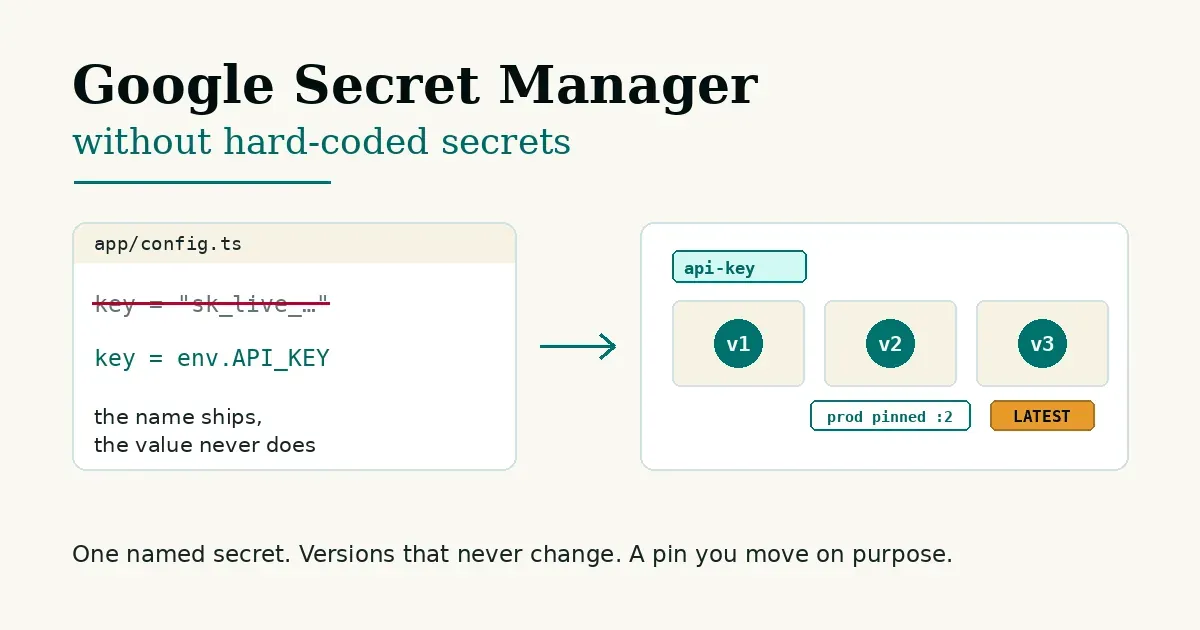
Google Secret Manager gives your application a controlled place to read sensitive values without keeping those values in source code.
New to Google Cloud? Start with the visual guide, which defines every term and walks through moving one key.
The model is simple: a secret is a named container, each value is an immutable numbered version, and IAM (Google Cloud’s permission system) decides which workload may read it. For production, pin the version you tested. Rotate by adding a new version, deploying it, verifying it, and only then disabling the old one.
If an API key has already been committed to Git, moving it into Secret Manager is not enough. Treat the key as exposed and rotate or revoke it. Deleting one line does not delete every clone, cache, fork, build artifact, or old commit.
This article is the reasoning beside the hands-on guide.
Why is hardcoding a secret such a problem?
Hardcoding usually starts as a shortcut. You need an API key, the app needs a string, and putting the string in a config file gets the first request working.
The problem is what happens next.
That value enters Git history. It may be copied into branches, forks, local clones, container layers, CI output, screenshots, support messages, and shell history. Removing the current line solves only the current line.
It also couples credential rotation to a code change. Every time the value changes, the application has to change with it. Now the team has to answer three separate questions at once: Where is the current value? Which copy is live? Who can read it?
Secret Manager separates those concerns. Code holds the resource name. Secret Manager holds the value. IAM controls access.
That does not make the secret harmless. It makes the boundary explicit enough to manage.
What is Google Secret Manager actually storing?
Google describes Secret Manager as a managed service for sensitive data such as API keys, passwords, certificates, and other credentials.
There are two objects to keep straight:
- The secret is the named resource and its metadata.
- A secret version contains the actual payload.
A secret can have version 1, version 2, version 3, and so on. The payload inside each version is immutable. You do not edit version 2. You add version 3.
That is the idea that makes the rest of the product click.
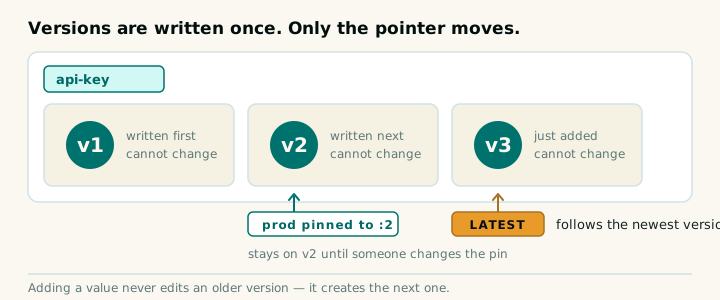
Immutability gives you a record of what changed and a known value to return to. It also forces a cleaner rotation shape: add → verify → move traffic → retire.
What does latest mean?
latest points to the most recently created version. It is a moving alias, not a copy of the payload and not a promise that the newest value works.
That distinction matters in production.
Google’s create-and-access quickstart says not to use the latest version specifier for production applications and to specify a version by ID instead. Google also documents strong consistency when a newly added version is accessed by its numeric version number; that statement does not extend to aliases such as latest.
My default is therefore boring on purpose:
- Use
latestwhen convenience is the actual goal and the failure mode is understood. - Use a numeric version when a deployment should reproduce the exact value that was tested.
A pinned version makes rollback legible. If version 3 fails, the release can return to version 2. That rollback only helps if the upstream provider still accepts the old credential, so do not revoke the old value before the new one proves itself unless the provider gives you no overlap window.
How should an application read the value?
The application should use a service account or workload identity—the identity your app runs as—not carry another long-lived key just to retrieve the first key.
For Cloud Run, Google supports two direct integrations:
- A mounted secret volume, where the value appears as a file and is fetched when read.
- A secret-backed environment variable, where Cloud Run resolves the value before an instance starts.
Google’s Cloud Run secrets documentation recommends pinning environment-variable secrets to a numeric version. That is a useful failure mode: if secret retrieval fails, Cloud Run does not start the instance rather than letting the application continue without the intended credential.
An application can also call Secret Manager through a Google Cloud client library. Application Default Credentials (ADC) is how client libraries find credentials automatically: a local developer identity during development or an attached service identity in Cloud Run.
For local work, gcloud auth application-default login creates ADC credentials for client libraries. Those are separate from normal gcloud auth login CLI credentials. They still deserve care: do not commit the ADC file, do not copy it into a container, and do not confuse local convenience with production identity design.
Who should be allowed to read a secret?
The role most applications need is roles/secretmanager.secretAccessor. Its relevant Secret Manager permission is secretmanager.versions.access.
The important part is where you grant it.
Granting Secret Accessor on a project gives the principal access to every secret in that project. Granting it directly on one secret limits the principal to that secret. Google supports the secret as the lowest resource level for this role.
The pattern I want is workload → exact role → exact secret.
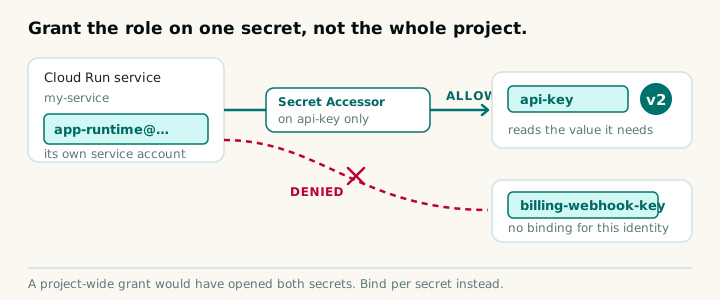
Use a dedicated service identity for the workload. Grant Secret Accessor only on the resources it actually reads. Do not give Secret Manager Admin to an application whose job is to retrieve one payload.
This also improves the audit story. Administrative changes such as adding, disabling, or destroying versions generate Admin Activity logs. The Secret Manager audit-logging documentation classifies payload reads as Data Access events. Google’s Cloud Audit Logs documentation notes that Data Access logs are generally disabled by default and must be enabled explicitly.
If nobody has enabled the read logs, do not claim that every payload access is already recorded.
What does safe rotation look like?
Secret Manager versions can be enabled, disabled, or destroyed.
Disabled is reversible. Access is blocked, but the stored payload remains and the version can be enabled again.
Destroyed is terminal after permanent destruction. By default, destruction is immediate. Secret Manager also supports an optional destruction delay of 1 to 1,000 days. During that configured window, scheduled destruction can be canceled. After the deadline, the payload is gone.
Google’s Secret Manager best practices recommend disabling a version before destroying it and watching for failures. That gives you a reversible check before an irreversible action.
A rotation schedule does not magically rotate a database password or third-party API key. It sends a notification through Pub/Sub, Google’s messaging service. Something still has to do the work:
- Get a new key from the provider.
- Add it as a new Secret Manager version.
- Point the app at the new version number (on Cloud Run, updating the pin deploys a new revision).
- Check the real application path works.
- Disable the old version and watch for failures (reversible).
- Retire: revoke the old key at the provider, then destroy the old version once recovery is no longer needed.
That sequence keeps the reversible steps in front of the irreversible ones.
How do I migrate a hardcoded secret safely?
Start with inventory, not replacement.
Look in source files, deployment manifests, CI settings, container build arguments, generated artifacts, logs, local scripts, and documentation. Do not print candidate values while searching. Report locations and masked fingerprints instead.
Then move one credential through the complete path:
- Create the Secret Manager resource with the replication policy you intend.
- Add the replacement credential as a version without putting the value in the command line or logs.
- Grant the workload identity Secret Accessor on that secret only.
- Change the application to use a Cloud Run secret integration or a client library with ADC.
- Pin the tested numeric version in production.
- Deploy and verify startup, retrieval, normal behavior, and failure behavior.
- Remove the plaintext value from the current source tree and build inputs.
- Rotate or revoke any credential that previously entered Git or another uncontrolled location.
- Add prevention: secret scanning, narrow IAM, Data Access logs where required, and a repeatable rotation procedure.
Do not rewrite shared Git history as a casual cleanup step. Rewriting can reduce accidental rediscovery, but it disrupts collaborators and does not invalidate a credential already copied elsewhere. Rotation is the security boundary.
Do not put a service-account JSON key into Secret Manager if the workload can use an attached service identity, impersonation, or workload identity federation, which lets workloads outside Google Cloud authenticate without a stored key.
Use this migration prompt
I wanted a prompt that would make a coding agent do the careful work instead of stopping after replacing one string with one environment variable.
Paste this into your coding assistant from the repository you want to inspect:
Help me move hardcoded credentials in this repository into Google Cloud Secret Manager without exposing any secret value.

RULES
1. Show me the full plan before edits, and wait for my approval.
2. Never print a credential, not even part of one. Report each finding as file:line, the kind of secret, and a label that contains no characters from the value.
3. Never fetch or echo a secret payload into this conversation. Do not run gcloud secrets versions access just to show me a value.
4. No destructive operations and no history rewrites. Do not delete secrets or versions, do not force push, and do not rewrite git history.
5. Stop and ask if the project, the service identity, the rollback plan or my approval is missing.

STEPS
1. Inventory, read-only: search source, config, .env* files, deployment manifests, CI settings, build arguments, scripts and docs.
2. Confirm the Google Cloud project with me, then enable the API:
   gcloud services enable secretmanager.googleapis.com
3. For each secret, propose a kebab-case name, then create it and add the value:
   gcloud secrets create NAME --replication-policy=automatic
   printf '%s' "$VALUE" | gcloud secrets versions add NAME --data-file=-
   Use printf '%s', not echo: echo adds a newline that becomes part of the stored value.
4. Grant roles/secretmanager.secretAccessor on that one secret only, never project-wide, and only to the service account that runs the app:
   gcloud secrets add-iam-policy-binding NAME \
     --member="serviceAccount:SERVICE_ACCOUNT" \
     --role="roles/secretmanager.secretAccessor"
5. Change the code to read the value from an environment variable, a mounted secret file, or the Secret Manager client library. No hard-coded fallback: if the value is missing, fail closed with a clear error.
6. Make sure .env* is gitignored, and keep only names, never values, in .env.example.
7. For Cloud Run, pin a numeric version, for example NAME:2, not latest. To rotate: add a new version, then update the pin; that update deploys a new revision.
8. Run this project's build and tests, and confirm the app starts with no hard-coded values left.
9. Finish with a rotation checklist: every credential that ever touched git history is still in that history, so rotate or revoke it at its provider. Disable old versions before destroying them.
The interactive guide has the command-by-command version and a quiz that checks the lifecycle model.
Frequently Asked Questions
What is Google Cloud Secret Manager?
Google Cloud Secret Manager is a managed service for storing, versioning, controlling access to, and auditing sensitive values such as API keys, passwords, and certificates.
Can I edit a secret version?
No. A secret version is immutable, so changing a value means adding a new version and moving consumers deliberately.
Should a production application use latest?
Google recommends numeric version IDs for production applications because latest is a moving alias and can expose workloads to a newly added bad value.
Which IAM role lets an application read a secret?
roles/secretmanager.secretAccessor allows payload access and can be granted directly on one secret.
Can a destroyed secret version be recovered?
Permanent destruction cannot be reversed. If a destruction delay was configured beforehand, scheduled destruction can be canceled during its 1-to-1,000-day recovery window.
Does Secret Manager rotate credentials automatically?
No. A rotation schedule sends a notification. A workflow still has to create the upstream credential, add a version, deploy it, verify it, and retire the old credential.
Pin the version. Verify the rollout. Then rotate the exposed credential.